Slate Login
🍀 Enhancing Replacement Cost Accuracy
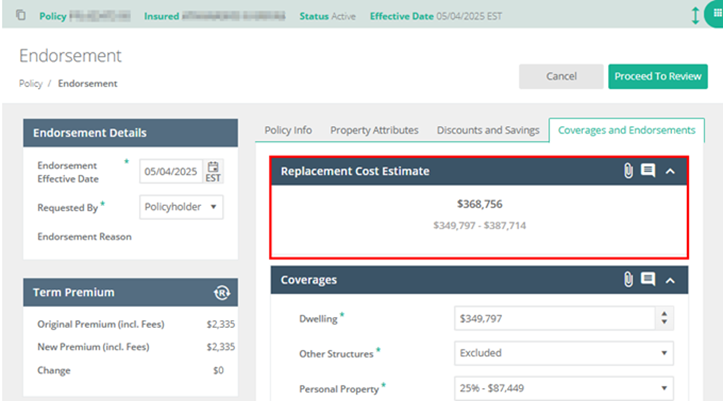
| Remember to take advantage of the Replacement Cost Estimate (RCE) range flexibility, which allows you to tailor coverage to your policyholder’s specific needs. To avoid an Underwriting Review before binding, select a Coverage A value that falls within the returned RCE range in the “Coverages and Endorsements” tab. If you choose a value outside the range, you’ll need to submit a detailed RCE from another vendor for Underwriting to review. Already submitted the quote and want to make a change? Good news! You can remove the “UW Review Required” flag yourself. No call to Underwriting needed! Simply:
|
🌈 A Lucky Trick: Requoting in Slate
| When running a quote through your preferred rater—like QuoteRush or EZLynx—don’t forget one small but mighty step in Slate: Requote. Why Requote? Some fields may update or change, and Agents have reported that this extra step helps fine-tune quotes and reduce the chance of triggering a “UW Review Required” flag upon submission. This is especially helpful for Coverage A, since raters may use different replacement cost valuation tools that don’t always match our estimate. Re-Quote in Slate
|
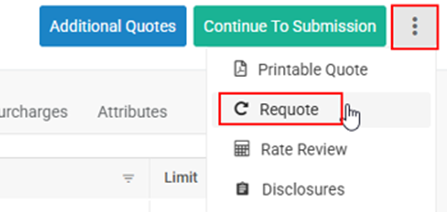
| A quick click now can save time later! |
💚 Set It and Forget It with Quote Preferences
| Want to make quoting even easier? Set quote-level system default preferences in Slate.
Agency Owners can establish defaults for HO-3 and Basic Choice quotes and customize:
|
| This helps create faster quotes and more consistent results across your agency. To set your preferences: 👉 Navigate to Agencies > Quoting Preferences Need a little help? Check out the How-To guide on our Slate Resource Page. And here’s a bit more good news: user-level quoting preferences are coming soon! 🎉
|



Latest Newsletters
-
 Tropical Storm Isaias: Binding Restrictions Effective 10/7/2026 4:00 PM EST 10– Florida Panhandle
Oct 7, 2026
Tropical Storm Isaias: Binding Restrictions Effective 10/7/2026 4:00 PM EST 10– Florida Panhandle
Oct 7, 2026 -
 Your PTI Fall Basket Is Full of Opportunities
Sep 24, 2026
Your PTI Fall Basket Is Full of Opportunities
Sep 24, 2026 -
 More Underwriting Changes: More Flexibility. More Opportunities.
Sep 8, 2026
More Underwriting Changes: More Flexibility. More Opportunities.
Sep 8, 2026 -
 Now Let’s Finish BIG
Sep 2, 2026
Now Let’s Finish BIG
Sep 2, 2026 -
 Eye on PTI: Cool Updates, Hot Opportunities
Aug 20, 2026
Eye on PTI: Cool Updates, Hot Opportunities
Aug 20, 2026